Wednesday, 11 May 2016

Sunday, 8 May 2016
Saturday, 7 May 2016
Master Boot Record
A device is "Bootable" if it carries a
boot sector with the byte sequence 0x55, 0xAA in bytes 511 and 512
respectively. When the BIOS finds such a boot sector, it is loaded into
memory at a specific location; this is usually 0x0000:0x7c00 (segment 0,
address 0x7c00). However, some BIOS' load to 0x7c0:0x0000 (segment
0x07c0, offset 0), which resolves to the same physical address, but can
be surprising.
When the wrong CS:IP pair is assumed, absolute near jumps will not work properly, and any code like mov ax,cs; mov ds,ax will result in unexpected variable locations. A good practice is to enforce CS:IP at the very start of your boot sector.

When the wrong CS:IP pair is assumed, absolute near jumps will not work properly, and any code like mov ax,cs; mov ds,ax will result in unexpected variable locations. A good practice is to enforce CS:IP at the very start of your boot sector.
On a hard drive, the so-called Master Boot Record (MBR) holds executable code at offset
0x0000 - 0x01bd, followed by table entries for the four primary partitions, using sixteen bytes
per entry (0x01be - 0x01fd), and the two-byte signature (0x01fe - 0x01ff).
Booting Process
An operating System (OS) is an intermediary between users and
computer hardware. It provides users an environment in which a user can
execute programs conveniently and efficiently.
In technical terms, It is a software which manages hardware. An operating System controls the allocation of resources and services such as memory, processors, devices and information.

Following are some of important functions of an operating System.
In technical terms, It is a software which manages hardware. An operating System controls the allocation of resources and services such as memory, processors, devices and information.
Definition:
An operating system is a program that acts as an interface between the user and the computer hardware and controls the execution of all kinds of programs.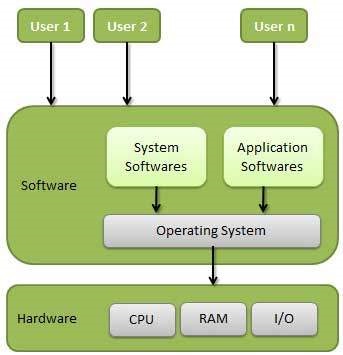
- Memory Management
- Processor Management
- Device Management
- File Management
- Security
Operating System - Introduction
An operating System (OS) is an intermediary between users and
computer hardware. It provides users an environment in which a user can
execute programs conveniently and efficiently.
In technical terms, It is a software which manages hardware. An operating System controls the allocation of resources and services such as memory, processors, devices and information.
Following are some of important functions of an operating System.
In technical terms, It is a software which manages hardware. An operating System controls the allocation of resources and services such as memory, processors, devices and information.
Definition:
An operating system is a program that acts as an interface between the user and the computer hardware and controls the execution of all kinds of programs. - Memory Management
- Processor Management
- Device Management
- File Management
- Security
Wednesday, 16 March 2016
Monday, 25 January 2016
C++ program to find area of triangle circle and square using function overloading
#include <iostream>
using namespace std;
class Shape{
public:
float findarea(float radii){
return(3.14*(radii*radii));
}
int findarea(int side){
return(side*side);
}
int findarea(int base, int height){
return((base*height)/2);
}
};
int main(){
int ch;
float r;
int b, h, s1;
cout << "Select and Find Area" << "\n1:CIRCLE 2:SQUARE 3:TRIANGLE " << endl;
cout << "Enter choice :";
cin >> ch;
Shape S;
if(ch==1){
cout <<"Enter radius: ";
cin >> r;
cout << "Area of circle of raduis " << r << " is " << S.findarea(r) << endl;
}else if(ch==2){
cout <<"Enter the value of Side ";
cin >> s1;
cout << "Area of square with side " << s1 << " is " << S.findarea(s1) << endl;
}else if(ch==3){
cout <<"Enter base and height: ";
cin >> b >> h;
cout << "Area of triangle with base " << b << " and height " << h << " is " << S.findarea(b, h) << endl;
}else{
cout << "Invalid input ";
}
return 0;
}

using namespace std;
class Shape{
public:
float findarea(float radii){
return(3.14*(radii*radii));
}
int findarea(int side){
return(side*side);
}
int findarea(int base, int height){
return((base*height)/2);
}
};
int main(){
int ch;
float r;
int b, h, s1;
cout << "Select and Find Area" << "\n1:CIRCLE 2:SQUARE 3:TRIANGLE " << endl;
cout << "Enter choice :";
cin >> ch;
Shape S;
if(ch==1){
cout <<"Enter radius: ";
cin >> r;
cout << "Area of circle of raduis " << r << " is " << S.findarea(r) << endl;
}else if(ch==2){
cout <<"Enter the value of Side ";
cin >> s1;
cout << "Area of square with side " << s1 << " is " << S.findarea(s1) << endl;
}else if(ch==3){
cout <<"Enter base and height: ";
cin >> b >> h;
cout << "Area of triangle with base " << b << " and height " << h << " is " << S.findarea(b, h) << endl;
}else{
cout << "Invalid input ";
}
return 0;
}
Thursday, 21 January 2016
Netcat

Netcat is a tool capable of writing data across a network using TCP or UDP protocol but this simple capability allows it to perform many functionalities. Its capability to create almost any kind of connection makes it a simple and efficient network debugging and exploration tool. It has been built in such a manner that it can act as a client as well as a server, which elevates its utility to a higher level.
Common uses for Netcat:
- Chat/Messaging Server : By using Netcat, an operator can redirect simple text between two computers in a simplistic chat or in an instant message interface.
Machine B C:\> nc 192.168.118.130 123

- File Transfers : Netcat allows you to transfer files between computers without the need to install a full-blown FTP server
Machine A root@bt:- # nc –lv -p 123 > test.txt
Machine B C:\> nc 192.168.118.130 123 < test1.txt

- Banner Grabbing : Netcat allows an operator to establish a socket to a specific port to potentially identify the operating system, service, version, and other information necessary to enumerate the purpose and/or potential weaknesses in the service.

- Port Scanning: Netcat allows the operator to utilize a rudimentary port scanning function, whereby a port or series of ports can be interrogated to determine if the port is open or closed.

- Port Redirection: A simple technique used to transfer traffic from one port to another. It is utilized to access services which are restricted in any specific environment.
Machine B Browse 192.168.118.130:8008

Subscribe to:
Posts (Atom)