Wednesday, 11 May 2016

Sunday, 8 May 2016
Saturday, 7 May 2016
Master Boot Record
A device is "Bootable" if it carries a
boot sector with the byte sequence 0x55, 0xAA in bytes 511 and 512
respectively. When the BIOS finds such a boot sector, it is loaded into
memory at a specific location; this is usually 0x0000:0x7c00 (segment 0,
address 0x7c00). However, some BIOS' load to 0x7c0:0x0000 (segment
0x07c0, offset 0), which resolves to the same physical address, but can
be surprising.
When the wrong CS:IP pair is assumed, absolute near jumps will not work properly, and any code like mov ax,cs; mov ds,ax will result in unexpected variable locations. A good practice is to enforce CS:IP at the very start of your boot sector.

When the wrong CS:IP pair is assumed, absolute near jumps will not work properly, and any code like mov ax,cs; mov ds,ax will result in unexpected variable locations. A good practice is to enforce CS:IP at the very start of your boot sector.
On a hard drive, the so-called Master Boot Record (MBR) holds executable code at offset
0x0000 - 0x01bd, followed by table entries for the four primary partitions, using sixteen bytes
per entry (0x01be - 0x01fd), and the two-byte signature (0x01fe - 0x01ff).
Booting Process
An operating System (OS) is an intermediary between users and
computer hardware. It provides users an environment in which a user can
execute programs conveniently and efficiently.
In technical terms, It is a software which manages hardware. An operating System controls the allocation of resources and services such as memory, processors, devices and information.

Following are some of important functions of an operating System.
In technical terms, It is a software which manages hardware. An operating System controls the allocation of resources and services such as memory, processors, devices and information.
Definition:
An operating system is a program that acts as an interface between the user and the computer hardware and controls the execution of all kinds of programs.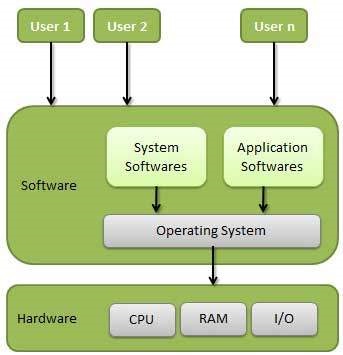
- Memory Management
- Processor Management
- Device Management
- File Management
- Security
Operating System - Introduction
An operating System (OS) is an intermediary between users and
computer hardware. It provides users an environment in which a user can
execute programs conveniently and efficiently.
In technical terms, It is a software which manages hardware. An operating System controls the allocation of resources and services such as memory, processors, devices and information.
Following are some of important functions of an operating System.
In technical terms, It is a software which manages hardware. An operating System controls the allocation of resources and services such as memory, processors, devices and information.
Definition:
An operating system is a program that acts as an interface between the user and the computer hardware and controls the execution of all kinds of programs. - Memory Management
- Processor Management
- Device Management
- File Management
- Security
Subscribe to:
Posts (Atom)